


Free Video Editors Without a Watermark: What Actually Exports Clean
VN is the free video editor that exports clean with nothing to delete, nothing to watch and no resolution cap — a full multi-track timeline and 4K 60f
Editorial Team · 2026-09-01

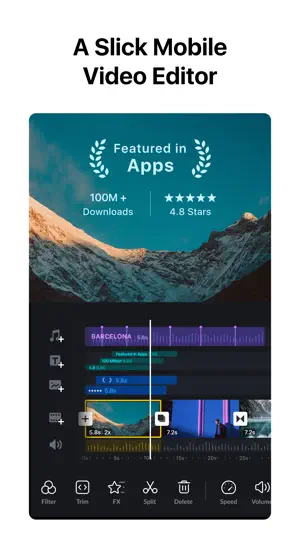



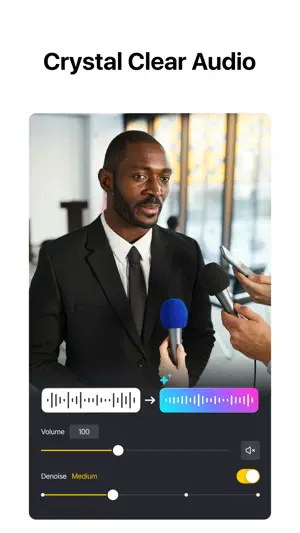

VN is the free phone editor with no watermark and no export paywall: a multi-track timeline with 0.05-second trimming, keyframes, masks, curves, auto captions with filler-word removal, beat-synced AutoCut templates and 4K 60 fps export, all without paying. Ubiquiti Labs' app has 100 million Android installs and a 4.7 from 5.5 million ratings; VN Pro adds AI tools at $7.99 a month or $69.99 a year. The trade-off in 2026 reviews is stability — lag, crashes and failed exports.
Specs come from the official store listings and were last checked on 2026-09-22. Developers change pricing and requirements — check the store page before installing.
The listing reads like a desktop editor's spec: frame-accurate trimming at 0.05 seconds with up to 30x timeline zoom, overlay layers for video, photos, stickers and text, masks, reverse, zoom and freeze frame, curve speed, keyframe animation, colour grading, and export up to 4K at 60 fps. On top sit the Smart Tools — auto captions in multiple languages with animated styles, text-to-speech voiceovers, one-tap cutout for video and photo backgrounds, AI frame interpolation for slow motion — and AutoCut and BeatsClips templates that cut footage to the beat. The September 2026 release adds filler-word removal after captioning, caption templates, HD collage export and frame capture. Reviewers keep comparing it with CapCut: a July 2026 five-star notes that 1080p export costs nothing here while CapCut charges, and an August 31 review calls it completely free with no watermark yet not stripped down. The one gap named is the music library.
Ninety-six Google Play reviews — 68 five-star, 13 one- or two-star — against 5.5 million ratings at 4.7. The most-voted, 29,243 votes from September 2024, chose VN because rivals had watermarks or two-draft limits, and adds that the app is laggy; the second, 24,938 votes, is a four-star for no ads, transitions and fonts. The 2026 complaints are about stability. A July 2026 one-star with 26 votes says a 90-second video with five overlays now crashes and fails to export after a year of use; another with 18 votes reports imported stock clips collapsing to 0.05 seconds. An August three-star lags after 30 seconds of overlays; September one-stars on 2.18.1 and 2.19.0 report the new stabilisation failing with a Retry error, mp3 files not recognised and overlays drifting between replays. A 2024 two-star with 2,287 votes lost saved projects to a confusing folder system.
Free means free here: no watermark, no export limits, ads only around saving, per a June 2026 review. The App Store lists VN Pro at $7.99 and $69.99 — monthly and yearly — and AI credits from $1 for 100 to $10 for 1,000, used by the AI Kits for image and video generation; Google Play's range is $0.99 to $34.99. Two money complaints: a September 2026 one-star says Pro-only features are not marked until export refuses, and an August two-star finds Pro too expensive to keep. Requirements: iOS 16.0 or newer at 623 MB with iPad and Apple Vision builds, or Android 7.0 or newer, in 18 languages, rated 4+ and Teen; a free account stores 100 projects, which a Chromebook user hit early. Ubiquiti Labs, LLC has published it since April 2018. Privacy: Apple lists identifiers not linked to you; Google's card says personal info, photos and videos and three other types are collected, none shared. Prices vary by region.
We don't host any files. These buttons open the official Google Play and App Store listings.
A 7.5: the most generous free editor on a phone — no watermark, no export wall, a real timeline — held back by a 2026 run of lag, crashes and failed exports that the reviews describe in detail. Take it if you want desktop-style control without paying and save often. Skip it if reliability at export matters more than price, or if your projects run past a few minutes with overlays.
No. Exports are watermark-free on the free version, and there are no resolution or frame-rate limits either — reviewers from 2024 to September 2026 name this as the reason they chose VN over CapCut and InShot. The free tier's limits are elsewhere: a 100-project store, ads around export, and AI tools that use paid credits.
Yes — up to 4K at 60 fps, free, per the listing, with presets for Reels and TikTok formats. Export is also where the 2026 complaints concentrate: a July one-star could not export a 90-second video with five overlays, and September reviews describe music failing to export as edited. Export a short test before a long project.
$7.99 a month or $69.99 a year on the App Store; AI image and video generation runs on credits from $1 for 100 to $10 for 1,000. Google Play's items run $0.99 to $34.99. Because the free tier already exports without limits, Pro is for the AI Kits and premium effects — and a September 2026 reviewer warns that Pro-only features are not labelled until export blocks them. Prices vary by region.
Editing and exporting run on the device; projects are stored locally, up to 100 on a free account. A connection is needed for the ads at export, for downloading music, fonts and templates, and for the AI tools — captions, text-to-speech, cutout, image and video generation — that use credits and servers.
It is published by Ubiquiti Labs, part of the networking company Ubiquiti, on the stores since 2018. Two things to check for client work: the licence terms on bundled music and templates, which VN's terms govern; and Google's data card, which lists personal info and your photos and videos as collected on Android, though nothing is shared with third parties.
VN is the free video editor that exports clean with nothing to delete, nothing to watch and no resolution cap — a full multi-track timeline and 4K 60f
Deleting a CapCut account is done from the Manage account page inside the app or the web editor, and the terms of service are blunt about what follows
If backup is on, deleting a photo in Google Photos deletes it in both places at once — the copy in the cloud and the copy on your phone. That is the w
About this page. ScoredApps reviewed VN: Photo & Video Editor independently. We don't own, develop, or distribute this app, and we're not affiliated with Ubiquiti Labs, LLC. Official site: www.vlognow.me/ · Google Play listing · Developer support: vn.support@ui.com

